
Challenges
As we might have already know, if we want to access a Private Nuget Feed on Azure DevOps Artifact, we will first need create a PAT (Personal Access Token), then we use this token to authenticate the Nuget Feed.
However, this PAT :
- Requires a user account in our Azure Entra
- It has an expiration up to 1 year
If you struggle with using a user account and having to manually update tokens every year, this article is for you.
In this article, I will demonstrate how to use a Service Principal and Federated Credentials to create a temporary access token for authenticating a NuGet feed. This approach:
- It doesn’t required any user account in Azure Entra.
- It’s password-less that mean we won’t need to take care of the access token and it’s expiration date.
Background
What is Service Principal ?
To access resources that are secured by a Microsoft Entra tenant, the entity that requires access must be represented by a security principal.
This requirement is true for both users (user principal) and applications (service principal).
The security principal defines the access policy and permissions for the user/application in the Microsoft Entra tenant. This enables core features such as authentication of the user/application during sign-in, and authorization during resource access.
(See: https://learn.microsoft.com/en-us/entra/identity-platform/app-objects-and-service-principals)
Preparation
Setup your Service Principal
Step 1: Creating an Application via Azure Portal
As mentioned earlier, to delegate identity and access management functions to Microsoft Entra ID, an application must be registered with a Microsoft Entra tenant.
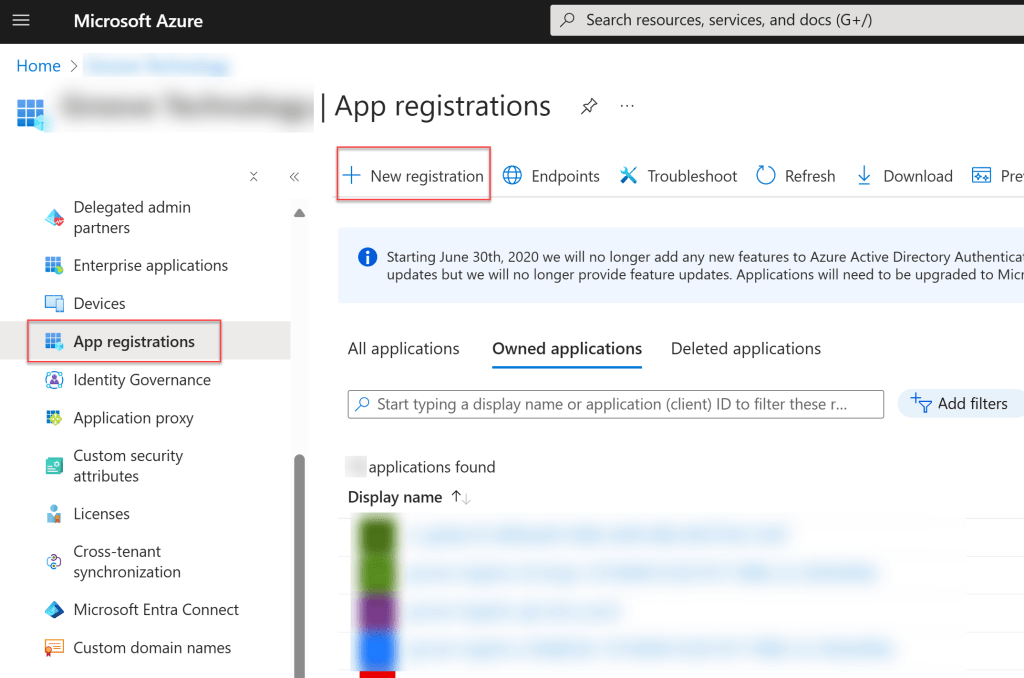
Then take a note of your Client ID and Tenant ID, we will use them to generate Entra Id Access Token, and use this Token as the password to access the Nuget feed.

Step 2: Certificates & secrets
I always prefer paswordless approach when It’s possible, so that in this step I will use “Federated Credential“

Using Github Action’s federated scenario.

Setup Github variables
It’s recommened to configure all dynamic variables or secret in Github “Actions secrets and variables”.
In this article I will store information of the service principal in variables.

There are 2 variables:
AZURE_SP_CLIENT_ID: which is the Client ID of the Application that we created.AZURE_SP_TENANT_ID: which is the Tenant ID of the Application that we created.
Setup your nuget source via nuget.config
In the root directory that hold your solution file (*.sln), I create a nuget.config file to store the feed source:
<?xml version="1.0" encoding="utf-8"?>
<configuration>
  <packageSources>
    <clear />
    <add key="myprivatefeed" value="https://pkgs.dev.azure.com/hungdoan-lab/Project01/_packaging/hungdoan-test-privatefeeds/nuget/v3/index.json" />
    <add key="nuget.org" value="https://api.nuget.org/v3/index.json" />
  </packageSources>
</configuration>
NOTE: In this file, I only define the source URL. I will update the credentials separately from the workflow pipeline
Your pipeline
Given Context: I’m setting up a GitHub Actions pipeline to build my .NET application whenever a commit is pushed to the main branch.
In that case, I would create a workflow file in .github\workflows\build_main.yml :
name: "Build on push"

on:
  push:
    branches:
      - main

permissions:
  id-token: write
  contents: read

jobs:
  build:
    runs-on: windows-latest
    steps:
      - name: "Checkout"
        uses: actions/checkout@v4

      - name: "Setup .NET"
        uses: actions/setup-dotnet@v4
        with:
          dotnet-version: 8.0.x

      - name: "Login to Azure Service Principal"
        uses: azure/login@v2
        with:
          client-id: ${{ vars.AZURE_SP_CLIENT_ID }}
          tenant-id: ${{ vars.AZURE_SP_TENANT_ID }}
          allow-no-subscriptions: true

      - name: "Get Azure Entra Id Token for Azure DevOps"
        id: "get_nuget_access"
        shell: pwsh
        run: |
          # Set the SCOPE configuration variable to "499b84ac-1321-427f-aa17-267ca6975798/.default"
          # to refer to the Azure DevOps resource and all of its scopes.
          $access_token = $(az account get-access-token --resource=${{ vars.AZURE_SP_CLIENT_ID }} --scope=499b84ac-1321-427f-aa17-267ca6975798/.default --query accessToken -o tsv)

          # Export variables to Github's Ouput Context
          echo "NUGET_TOKEN=$access_token" >> $env:GITHUB_OUTPUT

      # Assuming we have alreay had a feed source config in a Nuget.config file
      # Otherwise we can just use "dotnet nuget add source" instead
      - name: "Update Nuget source credentials"
        env:
          NUGET_TOKEN: ${{steps.get_nuget_access.outputs.NUGET_TOKEN}}
          NUGET_FEED_NAME: "myprivatefeed"
        run: |
          dotnet nuget update source $env:NUGET_FEED_NAME --username optional --password $env:NUGET_TOKEN

      - name: "Build project"
        run: |
          dotnet restore
          dotnet build --no-restore --configuration Release
In this workflow:
- id-token permission is required for “Azure/login” job.
How does it work actually?
The whole script is simply about creating a Azure Entra Id Token, then use this token to access Nuget, and then we use that token to access Nuget.
You can see that I use Azure/login (See https://github.com/Azure/login) tool to login into our Service Princial, which support federated identity credential on my service principal.
Conclusion
We went through the steps to define an Azure Action workflow to access a private NuGet feed on Azure DevOps, which use Service Pricipal and federated identity
I believe this approach is more secure and easier to maintain compared to the PAT approach.
Hopefully, this will be helpful.






 Hung Doan
Leave a comment